On-call
- Being on-call
(of a person) able to be contacted in order to provide a professional service if necessary, but not formally on duty.
“our technicians are on call around the clock”
synonyms: on duty, on standby, available
“Dr. Merton is on call this evening”
Users and consumers expect their favorite websites and services to be constantly accessible. Have you ever seen Facebook, Amazon, LinkedIn, Ebay down? Probably not. Any downtime means users frustration and potentially millions of dollars in loss. That’s true for the big players but also for any company where its online presence is crucial, which is the case for a lot of businesses.
This does not happen magically. Software engineers are building reliable systems that are supposed to be up and running 100% of the time, but sometimes things go sideways and the issue needs to be fixed as soon as possible. To achieve quick resolution time, companies are putting in place monitoring systems to detect any anomaly and alert the employee who is on-call. This sometimes happens during working hours, but also at 3am or at night.
- Setup
To be on call you need at least 4 components:
A service or website you want to monitor
A monitoring tool
An oncall management system
A software engineer (that’s you)
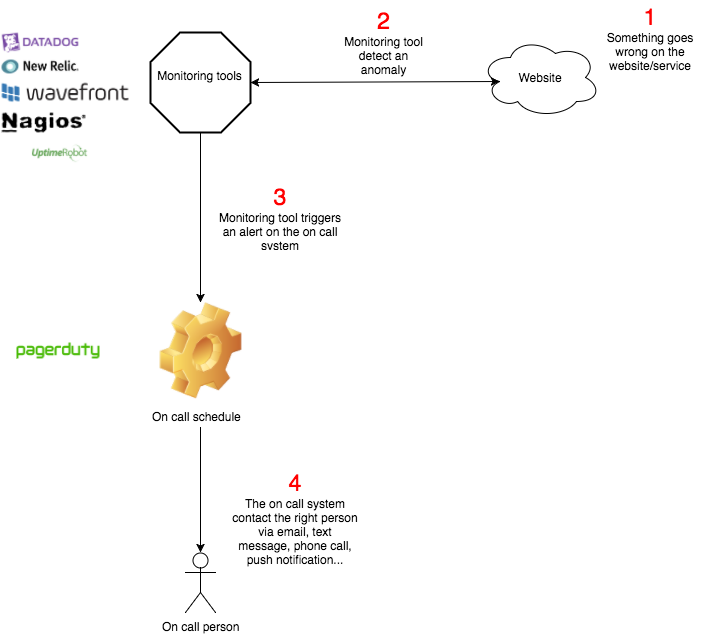
- A service or website you want to monitor
You can monitor thousands of things
Is my website returning HTTP 200?
Is my website loading in less than 500ms?
Is my webserver daemon up?
Is there more than 50% free disk space on my server?
…
- A Monitoring Tool
You need to configure one or multiple monitoring tool(s) to your on-call system, they are the ones that will actually detect any anomaly and report it to the on-call platform. Check out the Monitoring concept page for recommandations.
- On-call management system flow
Let’s get a bit more into detail about the flow of an on-call management system such as PagerDuty. First of all you have to understand that PagerDuty is not monitoring your website, it acts as a gateway between your monitoring tools and the software engineers that are on-call. Its goal is to alert, as soon as possible, as reliably as possible and as efficiently as possible the person or team on-call. That’s a very hard duty because if PagerDuty goes down then many sites or services going down at the same time won’t be fixed because the alerts won’t reach the on-call persons.
Let’s get into a simple and typical workflow:
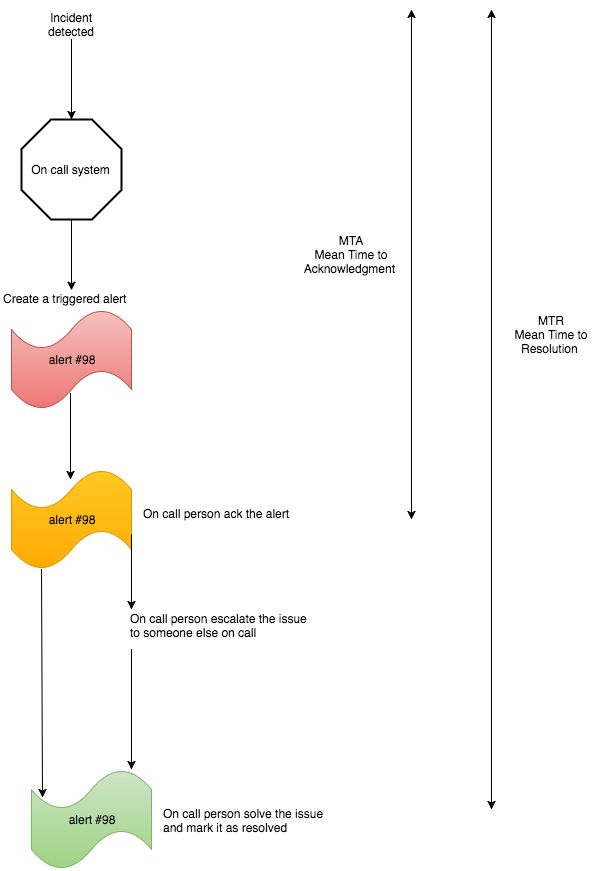
1. An incident has been detected by an external monitoring tool that notifies PagerDuty.
2. PagerDuty creates an incident and assigns it to the on-call person, the alert is in a “triggered” mode.
3. The on-call person gets notified and acknowledges the alert meaning that the software engineer is looking into the problem.
4. If the engineer cannot solve the issue, she/he can escalate it (pass it on) to another co-worker. PagerDuty also allows automatic escalation in case the on-call person does not acknowledge the alert (which means that for some reason the on-call person is not available - no battery on the phone, not hearing the ringtone and all sorts of good stuff :-))
5. A brilliant software engineer (most likely a Holberton School member) solves the issue and marks the incident as solved. Depending on the type of alert and service that notified PagerDuty, it can be auto-resolved.
On-call teams are usually rated on 2 metrics:
MTA (Medium Time to Acknowledgement): The time between an alert/incident is created and an on-call person acknowledged it (which means that he or she is working toward a solution)
MTR (Medium Time to Resolution): The time between an alert/incident being created and this same incident/alert being marked as solved
You obviously want these mean times to be as low as possible. MTA basically tells how good engineers are at answering their phone. MTR basically tells how good engineers are at solving issues.
- PagerDuty
We made a partnership so that Holberton School students can utilize PagerDuty for free. For every student a team is created (team of one), we will also have teams for group projects later on.
Every PagerDuty team has an automatically created and linked: - Escalation policy - Services (which are monitoring tools, we can add more services upon demand to Holberton School staff)
We advise you to create accounts with the recommended monitoring tools and to connect them with PagerDuty using the pre-created services.
Also make sure to configure your profile to fill in your contact information and define the Notification Rules